According to Imperva's 2025 Bad Bot Report, bad bots now make up 37% of all internet traffic, and AI tooling is lowering the barrier for attackers to spin up high-volume, evasive campaigns. Your contact form, signup page, or password-reset endpoint does not need to be a high-profile target to attract abuse. It just needs to exist.
No single defense wins this on its own. A honeypot alone falls to a human spammer. Turnstile alone fails if you skip server-side validation. Rate limiting alone doesn't stop a distributed attacker with a large pool of IPs. Stack all three and you cover each one's blind spots.
This post walks through how each layer works, how they fit together, and the implementation details that most tutorials skip.
Cloudflare Turnstile
Turnstile replaces the traditional CAPTCHA with a set of non-interactive JavaScript challenges. It runs proof-of-work puzzles, proof-of-space checks, web API probes, and browser-quirk detection in the background. Cloudflare uses the signals from those challenges to decide how difficult a follow-up challenge to present, or whether to present one at all. Most real users never see or interact with anything.
That's a real UX improvement. Research cited around the space consistently finds that roughly 15% of users abandon forms when faced with a CAPTCHA. Turnstile's managed mode sidesteps that by only surfacing an interaction when signals look suspicious.
Turnstile also does not harvest data for ad retargeting, and it meets WCAG 2.2 AA compliance standards. You can embed it on any site without routing traffic through Cloudflare's network, and it runs without requiring any other Cloudflare service.
Widget modes
The Cloudflare docs describe three modes:
- Managed (recommended): Cloudflare chooses the challenge based on visitor signals. An interaction is only presented if automated traffic is suspected.
- Non-interactive: The widget renders visibly, but users do nothing. The challenge runs silently.
- Invisible: No visible widget at all. The challenge still runs. If you use this mode, Cloudflare requires you to reference their Turnstile Privacy Addendum in your privacy policy.
For most forms, managed mode is the right starting point. It adapts per visitor rather than locking you into a fixed friction level.
The two-key model
Each Turnstile widget uses a sitekey, a public identifier you drop into your HTML, and a secret key that lives only on your server. The browser widget generates a short-lived token after the challenge completes. Your server sends that token to Cloudflare's Siteverify API to confirm it's legitimate.
Free accounts support up to 20 widgets. If you're currently running reCAPTCHA or hCaptcha, Turnstile can drop in as a replacement by swapping the script tag.
Server-side validation is not optional
This is where most implementations break. The Cloudflare docs are direct about it: tokens can be forged. An attacker can POST any string to your form endpoint without ever completing a challenge. The client-side widget alone does not protect you.
Your backend must call:
POST https://challenges.cloudflare.com/turnstile/v0/siteverifyPass the token from the form submission along with your secret key. If the response says the token is invalid, reject the submission. Do this server-side only. If your secret key reaches the frontend, the protection is gone.
A few details worth knowing about tokens:
- Each token is valid for 300 seconds (5 minutes) after generation.
- Tokens are single-use. Validating a token twice will fail on the second call.
- The error codes
invalid-input-responseandtimeout-or-duplicatewill appear in your logs when tokens are rejected.
That 5-minute window creates a practical problem. The default Turnstile integration solves the challenge as soon as the page loads. A user who spends a few minutes filling out a long form, attaches a large file, or submits over a slow connection can easily exceed that window. When they submit, their token is already expired and Cloudflare rejects it.
The fix is to use execute mode and trigger the challenge from your form's submit handler rather than on page load. The token is then generated moments before the submission goes out, with minimal chance of expiry.
After deployment: watch the analytics
Cloudflare's Turnstile analytics surface token validation rates. A spike in invalid or expired tokens is a signal worth investigating. It could indicate bot activity, a misconfigured integration, or a timeout problem with slow users. Track this from day one.
Rotate your secret keys periodically using the dashboard or API. A leaked key means an attacker can call Siteverify themselves and confirm which tokens are valid.
Honeypot fields
A honeypot is a form field hidden from human visitors but visible in the HTML. Real users don't see it and don't fill it in. Bots parse the raw HTML, find every input, and try to fill them all out to maximize submission rates. When a bot fills the honeypot, your server flags the submission as spam and discards it silently. The bot gets no error. It thinks it succeeded.
This works well against generic, high-volume spam bots. It adds zero friction for real users. There's no external service dependency and no cost.
Implementation details
Hiding the field with display: none or visibility: hidden is not enough. Some bots check for those CSS properties and skip fields that match. Instead, position the field off-screen with CSS (position: absolute; left: -9999px or similar), and add these attributes to the input:
<input
 type="text"
 name="website"
 tabindex="-1"
 autocomplete="off"
 aria-hidden="true"
/>
tabindex="-1" keeps keyboard navigation from landing on it. autocomplete="off" reduces the risk of browser autofill touching it. aria-hidden="true" hides it from screen readers so it doesn't confuse assistive technology.
On the server, if request.body.website (or whatever you've named it) contains any value, reject the submission without informing the submitter why.
The autofill false positive
Password managers and some browser WebViews can silently autofill hidden fields. This is a documented issue that can block real users. If you see a pattern of legitimate-looking submissions being rejected, check whether autofill is the culprit. The autocomplete="off" attribute reduces this risk but doesn't eliminate it entirely.
Complement it with a timing check
Bots fill and submit forms far faster than humans. Record a hidden timestamp when the form renders, then check the elapsed time on submission. A form submitted in under one or two seconds is almost certainly a bot. This is easy to implement and pairs well with the honeypot: the two together cover more bot categories than either does alone.
Honeypot limitations
Honeypots fail against human spammers (click farms, paid operators) because a human simply doesn't see the hidden field and skips it naturally. They also fail against targeted attackers who read your form's HTML, identify the honeypot field by name or position, and exclude it from their submissions.
For a contact form or newsletter signup, honeypot plus timing check is usually enough. For a login form, password reset, or checkout endpoint, you need more.
Rate limiting
Even if every individual request passes your Turnstile check and skips the honeypot, an attacker submitting 10,000 requests per hour is still a problem. Rate limiting caps how many requests a given source can make in a time window, before or regardless of whether they pass other checks.
Rate limiting can sit at three different layers:
- Application layer: Backend logic tracks submissions per IP or session and returns a 429 after the threshold is hit.
- Web server layer: NGINX and Apache both have modules to throttle request rates at the server level.
- Infrastructure layer: Cloudflare WAF and AWS WAF can enforce rate limits before traffic even reaches your servers.
The infrastructure layer is preferable for high-volume attacks because it absorbs the load upstream. Cloudflare's WAF rate limiting documentation recommends a two-rule approach (a soft limit and a hard limit) to reduce false positives against legitimate persistent visitors.
Setting thresholds
The right limits depend on what the endpoint does. A contact form that a single user might submit once a week can tolerate tight limits: 5 to 10 POST requests per hour per IP is reasonable. A login endpoint should be stricter still: Cloudflare's own best practices documentation suggests something like 10 POST requests to /auth/token per hour per user.
Set limits too tight and you'll frustrate real users. Too loose and you leave the door open. Start conservative and adjust based on actual traffic patterns, not guesses.
Algorithm options
The algorithm you choose affects how the limit behaves at the boundary. Fixed Window is simple but can be gamed: an attacker who knows your window resets at the top of the hour can send a burst right at the boundary. Sliding Window smooths that out. Token Bucket allows short bursts and then refills gradually, which tends to feel more natural for legitimate high-frequency users. Leaky Bucket enforces a strict output rate regardless of input bursts.
For form endpoints, Fixed Window or Sliding Window is usually sufficient. Token Bucket is worth considering for APIs with legitimate burst patterns.
Rate limiting on your Siteverify calls
If you're calling Turnstile's Siteverify API, also apply rate limits on the endpoints that trigger those calls. A valid-looking token stream doesn't rule out token harvesting, where an attacker generates large numbers of tokens to probe your system. Limiting how many Siteverify calls a single IP or session can trigger within a window closes that gap.
Layering the three defenses
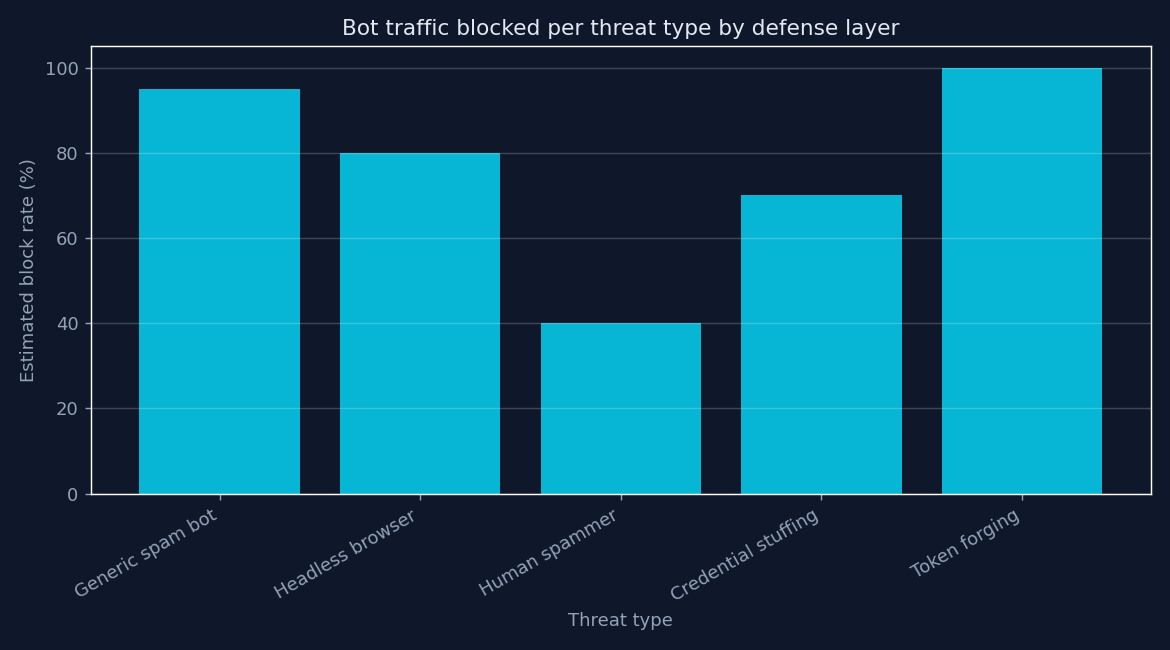
The correct mental model is: each layer fails in a different way, so you layer them to cover each other's failures.
| Threat | Honeypot | Turnstile | Rate limiting |
|---|---|---|---|
| Generic spam bot | Blocks | Blocks | Slows |
| Headless browser (e.g., Puppeteer) | May miss | Blocks (harder since late 2025) | Slows |
| Human spammer / click farm | Misses | Blocks | Slows |
| Credential stuffing (distributed) | Misses | Blocks many | Blocks sustained |
| Token forging | Irrelevant | Server-side catches | Irrelevant |
A real deployment example: In July 2025, Apollo.io faced a credential-stuffing attack that peaked at 80,000 events per minute. After deploying Turnstile on their login and signup endpoints, they blocked 2.6 million malicious requests with a 0% solve rate. Legitimate users saw a 12% improvement in login success rates during the attack, likely because the attack traffic that had been degrading server response times was cut off upstream.
That outcome required proper server-side validation. Without it, every one of those blocked bot requests could have been faked with a trivial string in the token field.
Where to start
For a low-risk contact or newsletter form, implement a honeypot with a timing check. That's free, takes under an hour, and handles the majority of generic bot traffic.
For a login, password-reset, checkout, or any endpoint that has real consequences if abused, add Turnstile in managed mode with server-side Siteverify validation and application-layer rate limiting. Put infrastructure-layer rate limiting (Cloudflare WAF or equivalent) in front of those endpoints if you can.
In either case, monitor the logs. Invalid token rates, honeypot trigger rates, and 429 response rates all tell you something. The numbers will shift as bots adapt, and your limits and configurations need to shift with them.